# How to Add Map to Your Page ?
**Through this document , you will uncover the 'Map' feature properties in site editor page through these key elements:[1. Adding a Map](https://kb.salerise.com/link/21#bkmrk-adding-heading)[2. Feature Settings Window](https://kb.salerise.com/link/21#bkmrk-feature-settings)[3. Style Settings Window](https://kb.salerise.com/link/21#bkmrk-style-settings)**
### **Adding a Map**
- Drag the map icon from the available features
[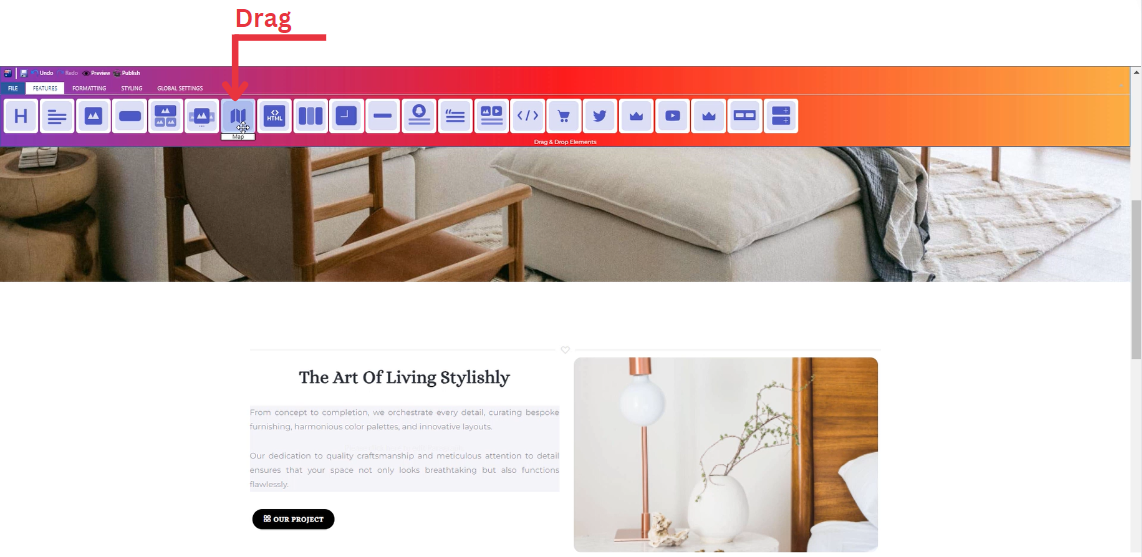](https://kb.salerise.com/uploads/images/gallery/2023-11/w8dimage.png)
- Drop the map icon into the desired location on your website page
[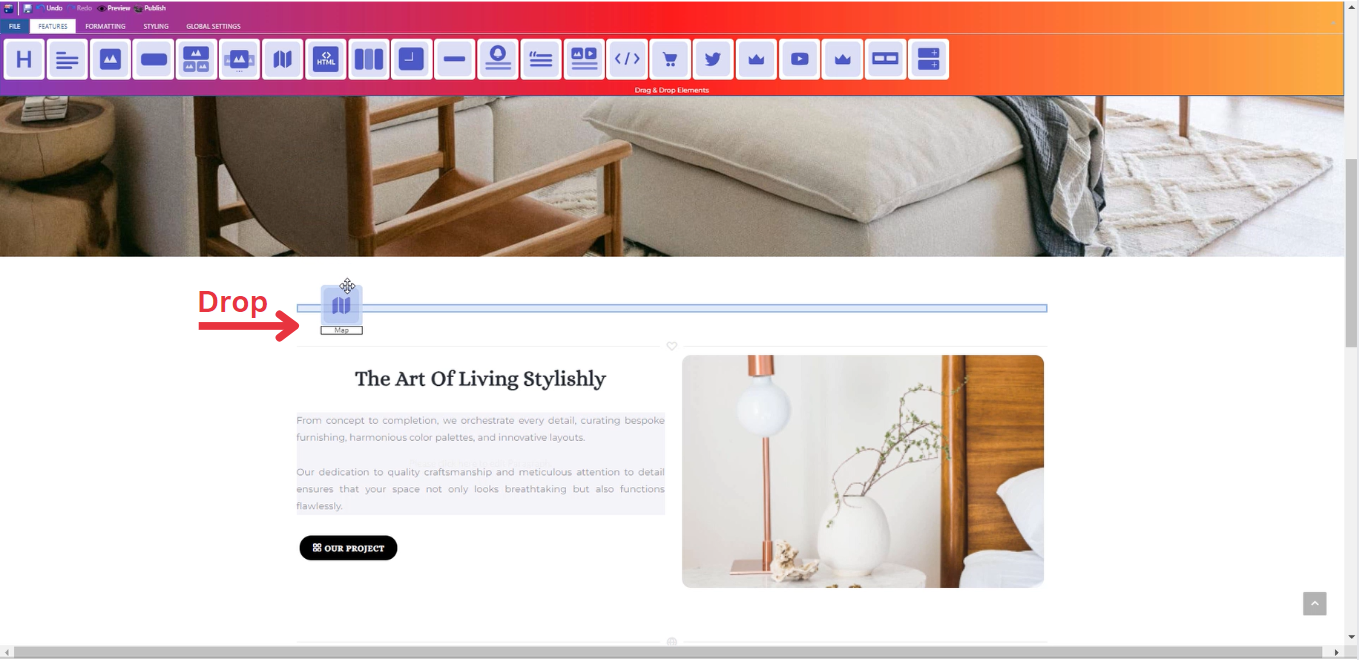](https://kb.salerise.com/uploads/images/gallery/2023-11/Kthimage.png)
### **Feature Settings**
- **Settings**
- Determine your address and description details.
- Determine how your map is visible on devices (Mobile , Tablet , Desktop , Large desktop).
**\_\_\_\_\_\_\_\_\_\_\_\_\_\_\_\_\_\_\_\_\_\_\_\_\_\_\_\_\_\_\_\_\_\_\_\_\_\_\_\_\_\_\_\_\_\_\_\_\_\_\_\_\_\_\_\_\_\_\_\_\_\_\_\_\_\_\_\_\_\_\_\_\_\_\_\_
**
- **Design**
- Customize your map dimensions (Width , Height).
\_\_\_\_\_\_\_\_\_\_\_\_\_\_\_\_\_\_\_\_\_\_\_\_\_\_\_\_\_\_\_\_\_\_\_\_\_\_\_\_\_\_\_\_\_\_\_\_\_\_\_\_\_\_\_\_\_\_\_\_\_\_\_\_\_\_\_\_\_\_\_\_\_\_\_\_
- **Animations**
- Add animation to your map from a long list of animation options.
- Enhance your animated map by incorporating timing in seconds.
### **Style Settings**
**Design Features**
- Access the "Design" feature to customize your map appearance. Within this feature, you can determine the following properties:
- **Margin**: Set the spacing around your map to control its placement on the page.
- **Border**: Define a border for your map to add a distinct visual element.
- **Color**: Choose the color that best complements your website's theme or design.
- **Style**: Apply different styles to your map, enhancing its visual appeal.
- **Gradient**: Add gradient effects to your map for a more dynamic and modern look.
**Background Features**
- Navigate to the "Background" feature to enhance the backdrop of your map.
- **Upload Images**: Insert images as a background for your map, providing visual interest.
- **Sample Images**: Explore pre-loaded image samples for quick and easy background selection.
- **Background Styling**: Customize the map background further with options like:
\- Background Repeat: Control how the background image repeats.
\- Background Fill: Adjust how the background fills the space around the map.
\- Background Position: Define the positioning of the background image for optimal display.
**Style Customization**
- Within the "Style" section, further refine your map presentation by adding classes from a dropdown list with a plethora of options.
- Determine how your map is visible on devices (Mobile , Tablet , Desktop , Large desktop.