# How to Add Heading to Your Page ?
**Through this document , you will uncover the 'Heading' feature properties in site editor page through two key elements:**
**[1. Adding a Heading](https://kb.salerise.com/link/14#bkmrk-adding-heading)**
**[2. Feature Settings Window](https://kb.salerise.com/link/14#bkmrk-feature-settings-win)**
### **Adding a Heading**
- Drag the Heading icon from the available features
[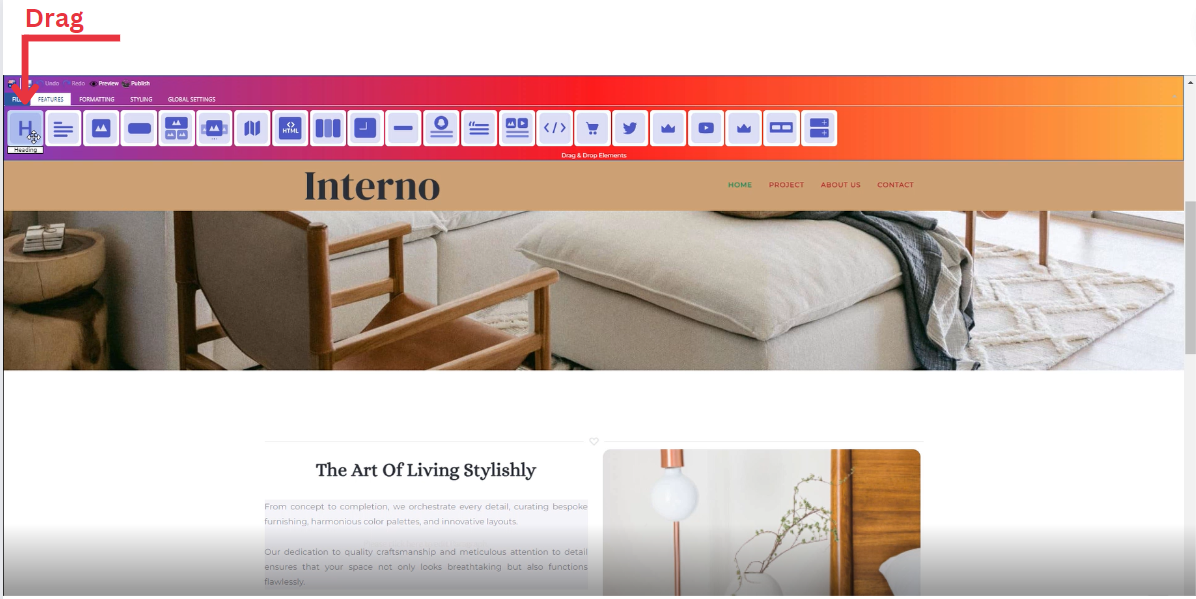](https://kb.salerise.com/uploads/images/gallery/2023-11/j0vimage.png)
- Drop the Heading icon into the desired location on your website page
[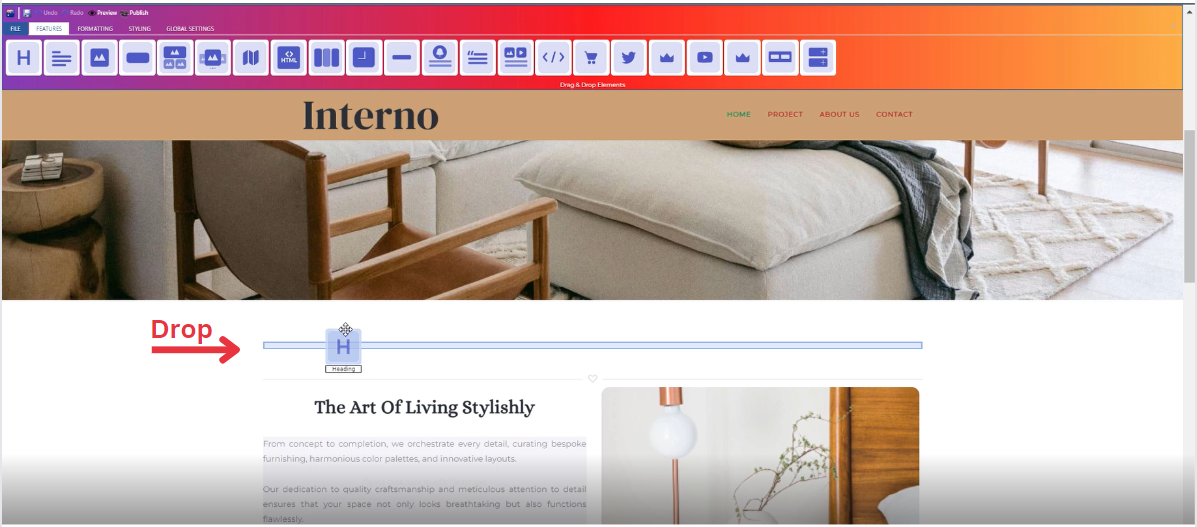](https://kb.salerise.com/uploads/images/gallery/2023-11/iHzimage.png)
### **Feature Settings Window**
Upon dropping the heading, a settings window will appear, offering four main features:
- **Theme**
- Explore different themes for your heading to align with your website's aesthetic
\_\_\_\_\_\_\_\_\_\_\_\_\_\_\_\_\_\_\_\_\_\_\_\_\_\_\_\_\_\_\_\_\_\_\_\_\_\_\_\_\_\_\_\_\_\_\_\_\_\_\_\_\_\_\_\_\_\_\_\_\_\_\_\_\_\_\_\_\_\_\_\_\_\_\_\_
- **Settings**
- Customize and enter your own text
- Add several classes from a long list of options
- Select heading level (H1,H2,H3,H4,H5)
- Determine how your heading is visible on devices (Mobile , Tablet , Desktop , Large desktop)
\_\_\_\_\_\_\_\_\_\_\_\_\_\_\_\_\_\_\_\_\_\_\_\_\_\_\_\_\_\_\_\_\_\_\_\_\_\_\_\_\_\_\_\_\_\_\_\_\_\_\_\_\_\_\_\_\_\_\_\_\_\_\_\_\_\_\_\_\_\_\_\_\_\_\_\_\_
- **Design**
- Determine the font type
- Determine font color with gradient
\_\_\_\_\_\_\_\_\_\_\_\_\_\_\_\_\_\_\_\_\_\_\_\_\_\_\_\_\_\_\_\_\_\_\_\_\_\_\_\_\_\_\_\_\_\_\_\_\_\_\_\_\_\_\_\_\_\_\_\_\_\_\_\_\_\_\_\_\_\_\_\_\_\_\_\_\_
- **Animation**
- Add animation to your text from a long list of animation options
- Enhance your animated text by incorporating timing in seconds