# How to Add Accordions to Your Page ?
**Through this document , you will uncover the 'Accordions' feature properties in site editor page through these key elements:
[1. Adding Accordions](https://kb.salerise.com/link/43#bkmrk-adding-a-slideshow)[2. Feature Settings Window](https://kb.salerise.com/link/43#bkmrk-feature-settings)[3. Style Settings Window](https://kb.salerise.com/link/43#bkmrk-style-settings)**
### **Adding Accordions**
- Drag the accordions icon from the available features
[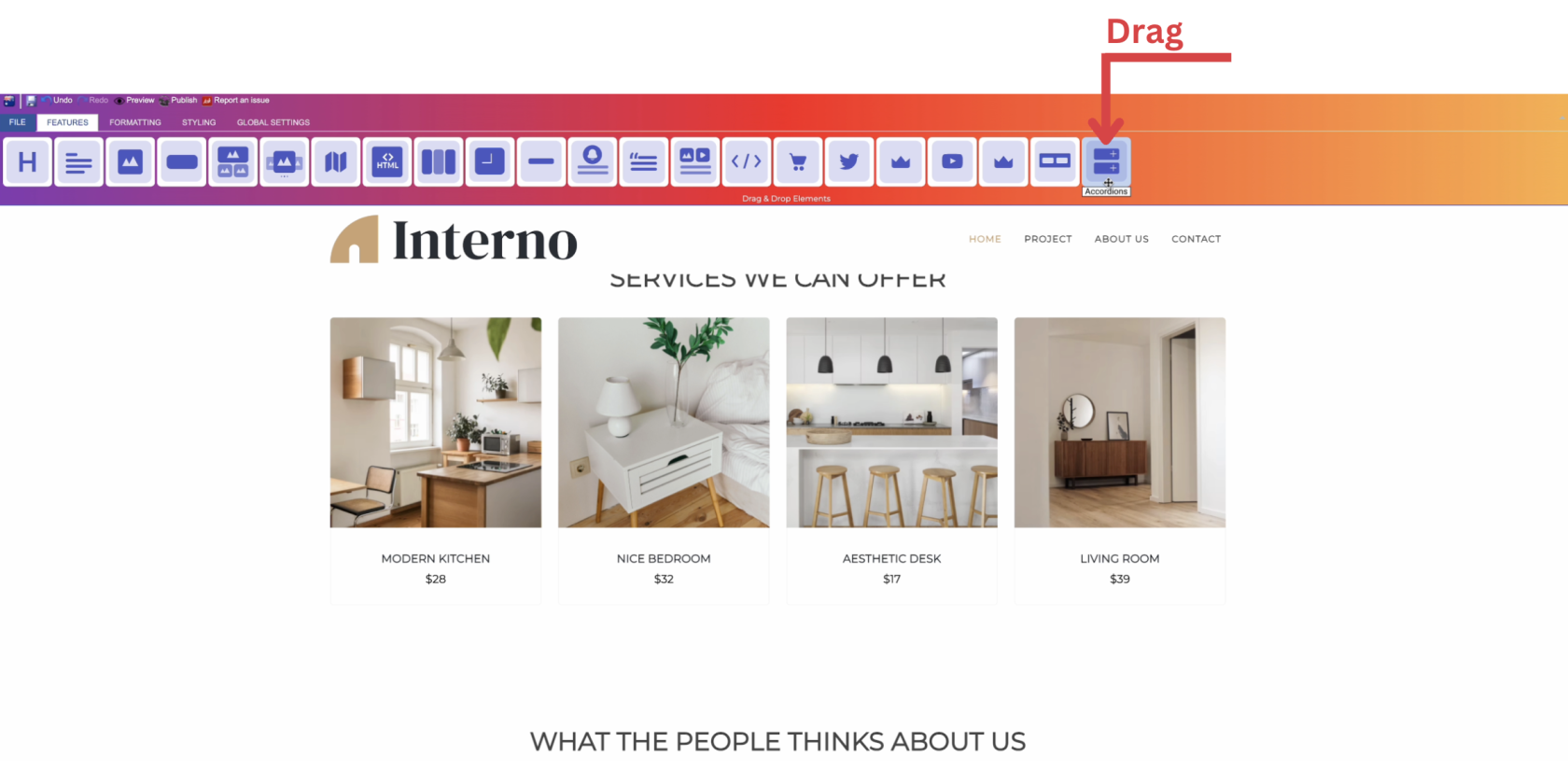](https://kb.salerise.com/uploads/images/gallery/2023-12/NuHimage.png)
- Drop the accordions icon into the desired location on your website page
[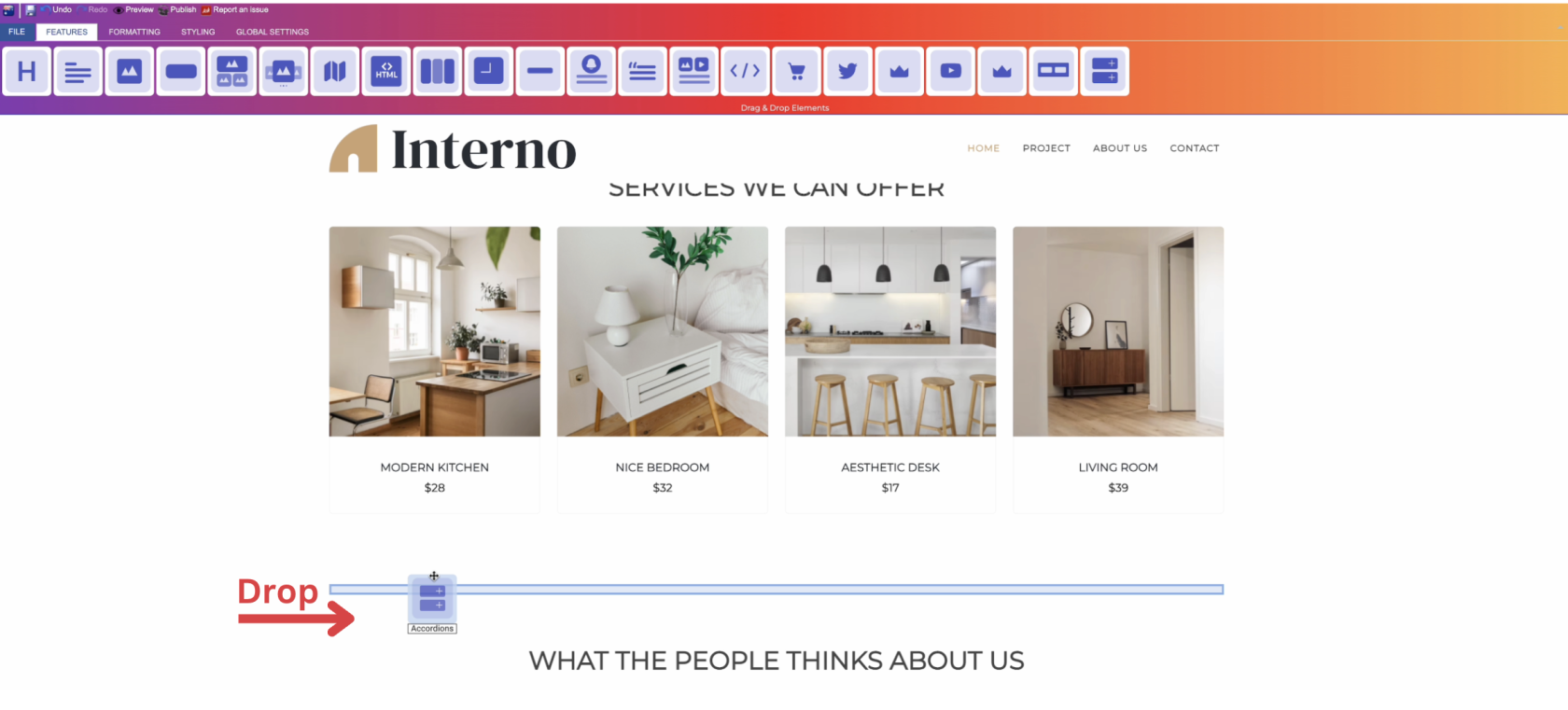](https://kb.salerise.com/uploads/images/gallery/2023-12/R4rimage.png)
### **Feature Settings**Upon dropping the accordions, a settings window will appear, offering three main features:
- **Themes**
- Explore different themes for your accordions to align with your website's aesthetic.\_\_\_\_\_\_\_\_\_\_\_\_\_\_\_\_\_\_\_\_\_\_\_\_\_\_\_\_\_\_\_\_\_\_\_\_\_\_\_\_\_\_\_\_\_\_\_\_\_\_\_\_\_\_\_\_\_\_\_\_\_\_\_\_\_\_\_\_\_\_\_\_\_\_\_\_
- **Settings**
- Add number of sections as desired and aligned with your website.
- Determine your title text and type (text , icon , or text and icon).
- Add content to your sections (optional).
- Determine how your sections are visible on devices (Mobile , Tablet , Desktop , Large desktop).\_\_\_\_\_\_\_\_\_\_\_\_\_\_\_\_\_\_\_\_\_\_\_\_\_\_\_\_\_\_\_\_\_\_\_\_\_\_\_\_\_\_\_\_\_\_\_\_\_\_\_\_\_\_\_\_\_\_\_\_\_\_\_\_\_\_\_\_\_\_\_\_\_\_\_\_
- **Animations**
- Add animation to your accordions from a long list of animation options.
- Enhance your animated accordions by incorporating timing in seconds.
### **Style Settings****Design Features**
- Access the "Design" feature to customize your accordions appearance. Within this feature, you can determine the following properties:
- **Margin**: Set the spacing around your accordions to control its placement on the page.
- **Border**: Define a border for your accordions to add a distinct visual element.
- **Color**: Choose the color that best complements your website's theme or design.
- **Style**: Apply different styles to your accordions, enhancing its visual appeal.
- **Gradient**: Add gradient effects to your accordions for a more dynamic and modern look.**Background Features**
- Navigate to the "Background" feature to enhance the backdrop of your accordions.
- **Upload Images**: Insert images as a background for your accordions, providing visual interest.
- **Sample Images**: Explore pre-loaded image samples for quick and easy background selection.
- **Background Styling**: Customize the accordions background further with options like:- Background Repeat: Control how the background image repeats.- Background Fill: Adjust how the background fills the space around the accordions.- Background Position: Define the positioning of the background image for optimal display.**Style Customization**
- Within the "Style" section, further refine your accordions presentation by adding classes from a dropdown list with a plethora of options.
- Determine how your accordions are visible on devices (Mobile , Tablet , Desktop , Large desktop.